
I help companies automate anything
One bot for one job. A fleet when you’re ready.
I help companies automate everyday work with AI agents. Start with a single task, then add bots as the first one earns its place.
What I work on
Custom AI agent and bot design
Single-purpose AI bots and agents designed around one job, with a person approving anything that goes out.
Workflow automation
Repetitive steps across the email, calendar and business tools you already use, automated and checked by a person.
Private local LLM setup
Language models running on your own hardware, so sensitive work doesn’t have to go to a cloud API.
Home lab and network security
Home lab and small-network setup and hardening, such as firewalls, VPNs and segmented networks.
AWS and cloud infrastructure
Cloud infrastructure on AWS, defined as code in Terraform.
Business bots I build
Pick one job. I build the bot for it.
Here are 14 supervised bots in four groups. Each one does one job and connects to the tools you already use. Customer-facing replies, public posts, payments and hiring decisions are always approved by a person.
Attract and convert
Lead capture & qualification
Greets inbound interest on your site, chat or inbox, asks qualifying questions, logs the lead and routes or books the meeting.
Connects to HubSpot · Salesforce · Web forms · Live chat · Calendly
Appointment scheduling
Offers open times, books or reschedules, and writes it to the calendar without the back-and-forth.
Connects to Google Calendar · Microsoft 365 · Calendly · Zoho Bookings · SMS reminders
Running in my own fleet: show Appointment Booker, Restaurant Reservations in the fleet mapFollow-up, inbox & CRM
Triages the shared inbox, drafts the next follow-up so leads don’t go cold and keeps CRM records current.
Connects to Gmail · Outlook · HubSpot · Salesforce · Slack
Running in my own fleet: show Inbox Triage, Night Shift (morning digest) in the fleet mapSocial content drafting
Turns approved photos, offers and notes into draft posts and captions, and schedules only what a person signs off on.
Connects to Instagram · Facebook · LinkedIn · Google Business Profile · Buffer
Serve customers
Customer support & FAQ
Answers common questions from your own help content and policies, and hands off to a person when it gets messy.
Connects to Zendesk · Intercom · Help center · Web chat · Email · SMS
Review & reputation
Watches new public reviews, drafts replies in your voice and alerts a person quickly when a low-star review lands.
Connects to Google Business Profile · Yelp · Facebook · Reputation platforms
Order & returns status
Answers “where is my order?” and starts or explains a return from live order and carrier data.
Connects to Shopify · Amazon Seller · UPS / FedEx / USPS · Helpdesk
Running in my own fleet: show Order Concierge in the fleet map
Run finance and operations
Invoice & document intake
Pulls invoices from email or a shared folder, extracts the fields, matches them to bills or POs and queues exceptions for a person.
Connects to Email · QuickBooks · BILL · Document storage
Expense, receipts & subscriptions
Captures receipts, codes expenses, flags odd charges and lists unused subscriptions to cancel or keep.
Connects to Card feeds · Expensify · BILL Spend & Expense · QuickBooks
Running in my own fleet: show Subscription Cleaner, Credit Card Max, Finance in the fleet map
Help the team work
Internal knowledge assistant
Answers staff questions from your handbooks, wikis and past tickets, cites its sources and escalates when unsure.
Connects to SharePoint · Google Drive · Notion · Confluence · Slack / Teams
IT helpdesk
Handles routine IT requests from a runbook, opens a ticket when it can’t and leaves security changes to a person.
Connects to ServiceNow · Jira Service Management · M365 / Workspace admin · Slack / Teams
Running in my own fleet: show Computer Expert, Network and firewall bot in the fleet mapMeeting notes & daily digest
Turns meetings into notes and action items, and sends a morning brief of the calendar, inbox and key numbers.
Connects to Zoom · Teams · Google Meet · Email · Calendar · Sheets
Running in my own fleet: show Night Shift (morning digest), Finance in the fleet mapRecruiting screener
Screens applicants against a written job profile, schedules first calls and drafts consistent summaries. A person makes every hiring call, and candidates are told when AI is used.
Connects to Greenhouse · Lever · Workday · Indeed · Calendar
Competitor & market watch
Sends a weekly, sourced brief on what competitors, listings and public conversation say about prices, offers and sentiment.
Connects to Public websites · Review sites · Marketplaces · Social listening · Email / Slack
Running in my own fleet: show Researchy, last30days, Deal Hunting, Local Deals, Seller in the fleet map
Tool names are examples of common integrations, not partnerships. “Running in my own fleet” means one of my own bots already does the same kind of work today. Select it to see which one in the fleet map below.
Built with guardrails
Human approval on outbound actions
Customer replies, public posts, purchases, payments and hiring decisions wait for a person to approve them. Bots draft; people send.
Your data stays in your accounts
Bots work inside the email, calendar and tools you already use, with the least access they need (read-only wherever that’s enough).
AI disclosure
Customer- and candidate-facing bots say they are AI and offer a path to a real person.
Private and local model options
Sensitive work can run on local models on your own hardware instead of a cloud API.
Proof
My own fleet, running today
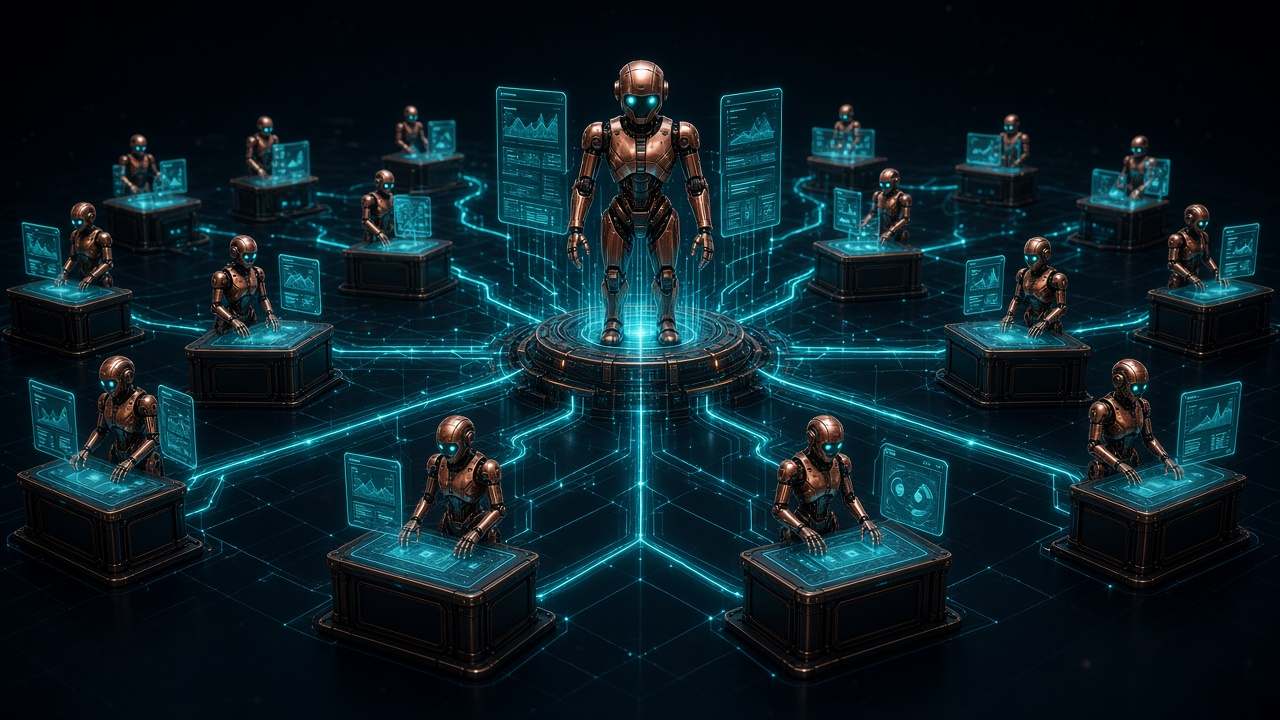
This is the structure of the 19-bot fleet I run every day. A router hands each request to a single-purpose specialist. Tap any bot to see its job.
Router hub
The front door. It takes any request and hands it to the right specialist, so no bot has to do everything.
Specialists grouped into 7 categories. Tap any bot to see its job.
Operations & inbox
4Email, daily briefings and admin follow-through.
Scheduling
2Calendar-aware scheduling on real provider sites.
Commerce & purchasing
3Buying smarter and selling faster, with approval gates.
Finance
2Read-only money insight, nothing moves without a human.
Research & intel
3Sourced, dated answers instead of guesses.
IT & infrastructure
2Network and device support with a human applying changes.
Read the whole fleet as a list
- Grok Bot (primary router): The front door. It takes any request and hands it to the right specialist, so no bot has to do everything.
- Inbox Triage (Operations & inbox): Sorts new mail, archives junk, sums up what matters and drafts replies for a human to review and send.
- Night Shift (morning digest) (Operations & inbox): Sends a weekday morning briefing: today’s calendar plus overnight email that needs action.
- Subscription Cleaner (Operations & inbox): Finds forgotten subscriptions and newsletters, unsubscribes only with approval and warns ahead of big renewals.
- Order Concierge (Operations & inbox): Tracks placed orders from shipping email, drafts returns and missing-package claims, and confirms refunds.
- Appointment Booker (Scheduling): Keeps recurring appointments booked by matching provider scheduling pages to open calendar slots.
- Restaurant Reservations (Scheduling): Checks open times, books, changes or cancels tables and joins same-day online waitlists.
- Deal Hunting (Commerce & purchasing): Compares the real landed cost (price, shipping and tax) at preferred retailers and watches for price drops.
- Local Deals (Commerce & purchasing): Scouts local used marketplaces for good finds, with scam safeguards built in.
- Seller (Commerce & purchasing): Prices items from comparable sales, writes listings, posts only after approval and drafts buyer replies.
- Finance (Finance): A read-only money desk for balances, spending, subscriptions, budgets, cash flow and investments.
- Credit Card Max (Finance): Picks the best card for each purchase for points and cash back, and tracks expiring statement credits.
- Researchy (Research & intel): A fact-check and web research desk that gives sourced, dated claims and never invents citations.
- last30days (Research & intel): Runs recent-sentiment sweeps of what people said in the last 30 days across social platforms and the web.
- YouTube Expert (Research & intel): Finds worthwhile videos, summarizes them and pulls out actionable steps.
- Network and firewall bot (IT & infrastructure): Runs an OPNsense firewall desk: reviews configs and logs read-only and drafts changes for a human to apply.
- Computer Expert (IT & infrastructure): Troubleshoots PCs and devices: OS fixes, drivers, apps, printers and backups.
- dr eggbot (meta-bot) (Bot design & web): Designs new single-purpose bots and runs the weekly fleet healthchecks and routine audits.
- Skyforge Web (Bot design & web): Builds and maintains this website: research, design, build and verification.
One router, many specialists
A router bot hands each request to a single-purpose bot, so every bot does one job well.
A bot that builds and audits bots
dr eggbot designs new single-purpose bots and runs weekly healthchecks: a friction scan and a routine audit.
Shared skills library (~50 skills)
Playbooks written once and reused across bots, so each specialist works the same proven way.
How we work
Start small. Grow when it pays off.
Workday audit
We map the repetitive work in your week, pick the first bot worth building and write a short plan.
First bot (one job)
One bot, one task, connected to the tools you already use, with a person approving anything that goes out.
Bot fleet
Once the first bot earns its place, we add more, and a router hands each request to the right one.
Bot care (ongoing)
Healthchecks, fixes and improvements after launch, the same weekly audits my own fleet gets.
What I build with
- Local & private LLMs (RTX 4080 Super desktop, Mac mini)
- Hybrid cloud + local models
- Home lab & network security (OPNsense)
- Private bot UIs over Tailscale
- AWS infrastructure in Terraform
Try it
See how a bot would fit
The quiz, demos and calculator run entirely in your browser. Nothing from those three is sent anywhere.
Which bot fits my work? (7 questions)
Rule-based demos: inbox, scheduling, invoices
Sample data, invented for this demo. Rule-based, not AI.
Time-back calculator
Arithmetic on the numbers you entered. Not an estimate, quote or promise.
Draft a project brief
Turn a description of a repetitive task into a brief you can copy or download. It stays on this page until you copy or download it yourself.
About
Built by a hands-on tinkerer
I'm Torben Verdich, founder of Skyforge Technology. I build and maintain a fleet of specialist bots and use that hands-on experience to help companies automate everyday work. My approach is to start with one clear job, keep people in control, and expand as the workflow proves useful.
Have something worth automating?
Prices aren’t published. Quotes are available on request.
Email Skyforge